5. Analysis and Design
This chapter explains what OsdagBridge does internally between the point where a user selects Design and the point where analysis results, design checks, and a 3D model become available for review.
5.1 Overview of the Analysis and Design Process
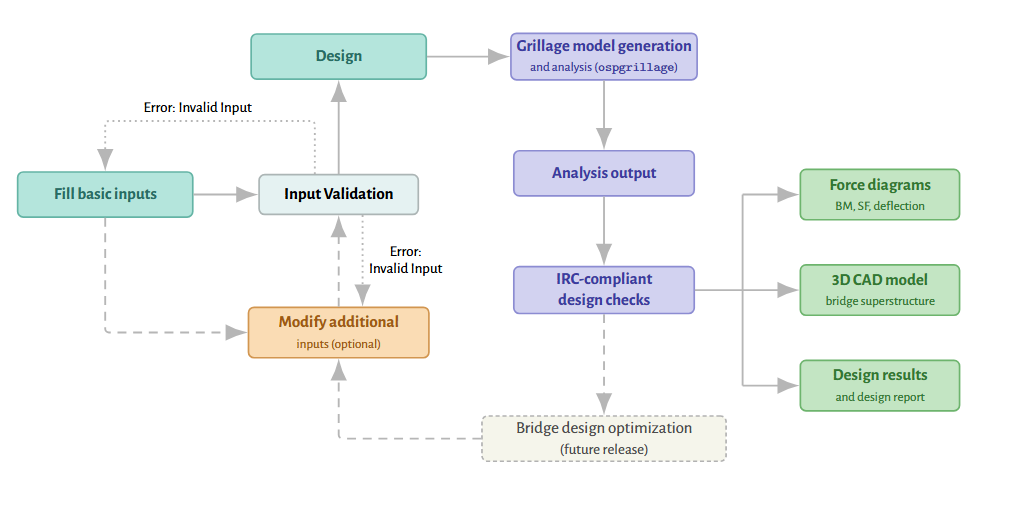
Once the required inputs have been provided, selecting Design triggers a sequence of internal stages that take the project from a defined geometry to a complete, code-checked bridge design. At a high level, this sequence is:
-
Mandatory Basic Input fields are used to derive the remaining secondary geometry through default assumptions, and the complete set of inputs is validated before proceeding.
-
The applicable IRC load cases are generated and a three-dimensional grillage model of the bridge is built and analysed.
-
The internal forces from the analysis are checked against the applicable IRC and IS design provisions for the steel girder.
-
Corresponding checks and results are generated for the transverse members, including cross bracing and end diaphragm, and for the deck.
-
The completed design is presented through the Output Dock, alongside the 3D CAD model.
5.2 Geometry and Grillage Model Generation
5.2.1 Automatic Geometry and Default Assumptions
Once the mandatory Basic Input fields have been provided, OsdagBridge applies standard-practice default assumptions to determine the secondary geometric parameters that are not directly requested from the user. These defaults allow the software to proceed directly to analysis and an initial girder design without requiring any Additional Inputs.
| Parameter | Default rule |
|---|---|
| Girder depth | Span / 18 initially, bounded between Span / 15 and Span / 25 |
| Flange width | 0.3 × girder depth; flange and web thicknesses from standard slenderness limits |
| Girder spacing | 2.5 m default; number of girders computed from the overall bridge width |
| Deck overhang | 0.35 × girder spacing |
| Deck thickness | 200 mm; wearing course: 50 mm bituminous layer |
| Crash barrier, railing, footpath geometry | From IRC:5 standard details |
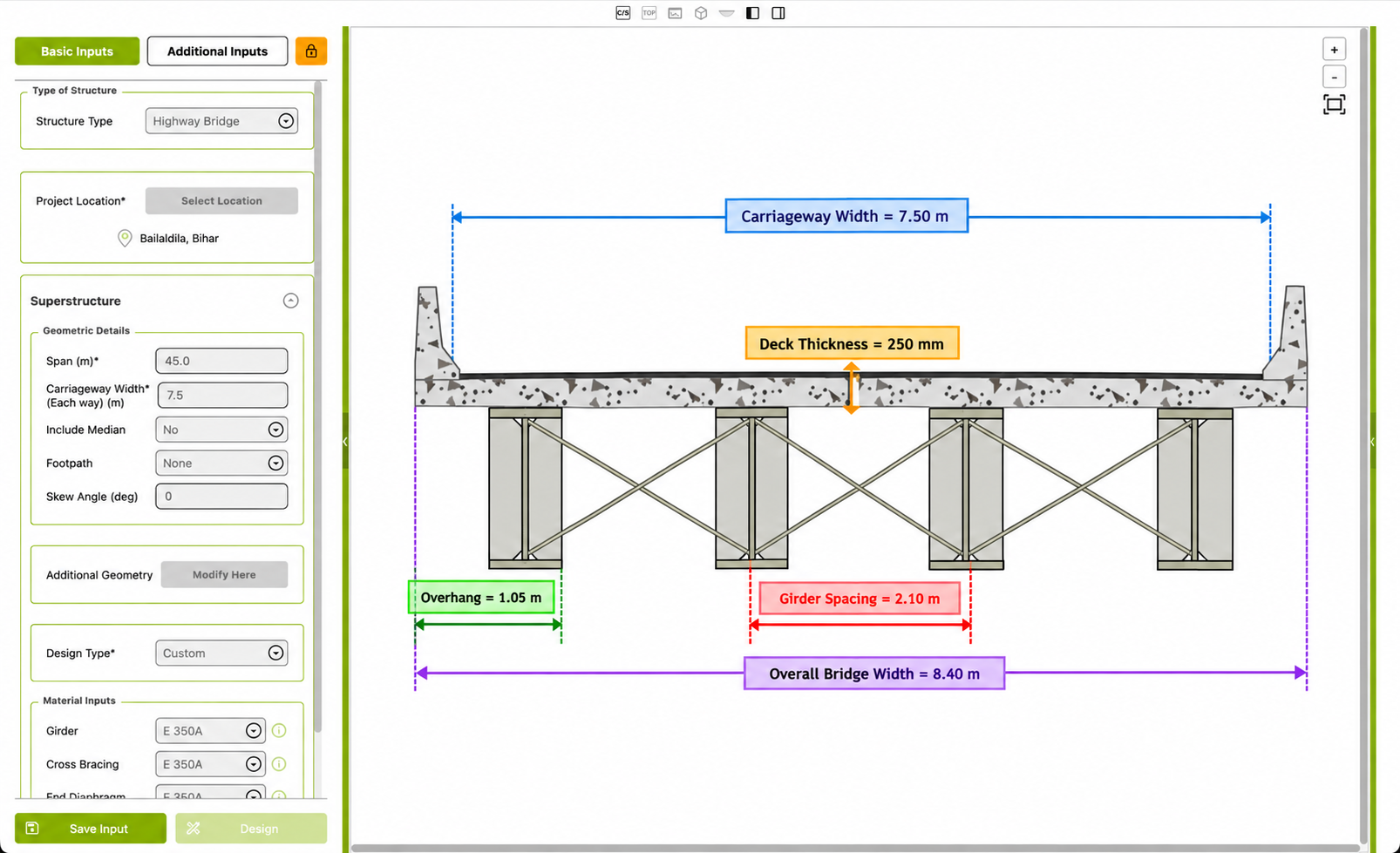
These defaults can be overridden through the Additional Inputs. The important point is that entering the mandatory fields is enough for OsdagBridge to automatically define the remaining geometry needed to form the bridge model.
The figure below shows the Basic Inputs form after the mandatory fields have been entered, together with the automatically generated 2D cross-section and top-view schematic. The drawing displays the derived values such as Overhang, Girder Spacing, Overall Bridge Width, Bracing Spacing, and Deck Thickness, showing how the secondary geometry is generated from the basic inputs.
After the mandatory and automatically derived inputs are available, OsdagBridge validates them before proceeding to analysis. If the validation succeeds, the process continues to the bridge layout stage. If a required input is missing or invalid, the process stops and reports an error.
5.2.2 Grillage Model Generation and Analysis
OsdagBridge analyses the bridge using the grillage method, in which the bridge deck is represented as a two-dimensional grid of beam elements. Longitudinal members represent the composite steel girders, while transverse members represent the deck and cross-frame members. This model is used to represent load distribution between the girders and the transverse behaviour of the deck.
The grillage model is generated and analysed using the open-source opsgrillage library, which uses OpenSeesPy as its finite element solver. The longitudinal member properties account for the composite girder and slab for normal analysis, while the bare steel section is used for the construction-stage check.
Live loads are automatically positioned across the carriageway and along the span to determine the governing effects on each girder. IRC:6 requirements for vehicle spacing and clearances are applied during this process. Other loads, such as dead, wind, seismic, and temperature loads, are applied directly to the model.
The figure above illustrates the grillage idealization, with the longitudinal lines representing the girders and the transverse lines representing the deck and cross-frame members.
5.3 Load Generation and Structural Analysis
Once the bridge geometry is complete and validated, OsdagBridge generates the applicable IRC load cases and analyses the bridge using a three-dimensional grillage model. This section covers the load types the software generates, how they are combined, how the grillage model itself is built and analysed, and what the analysis produces.
5.3.1 Load Types
OsdagBridge automatically generates the applicable IRC:6 load cases from the project's geometry, materials, and location. The user does not need to enter the load values directly.
The main load types generated or supported by OsdagBridge are:
-
Dead loads: Includes the self-weight and other permanent loads from the bridge geometry, such as the deck, crash barriers, median, and railing.
-
Live loads: Includes IRC standard vehicle classes such as Class A, 70R, Class AA, and Special Vehicle, along with custom vehicles, braking load, and footpath pressure. Vehicle positions are determined automatically during the analysis to obtain the governing effects.
-
Wind loads: Generated automatically according to IRC:6 using the wind conditions for the project location.
-
Temperature loads: Generated from the site's shade air temperatures according to IRC:6.
-
Seismic loads: Generated according to IRC:6 using the seismic parameters associated with the project location.
-
Custom loads: Users can additionally define point, line, or area loads at specified positions on the bridge.
5.3.2 Load Combinations
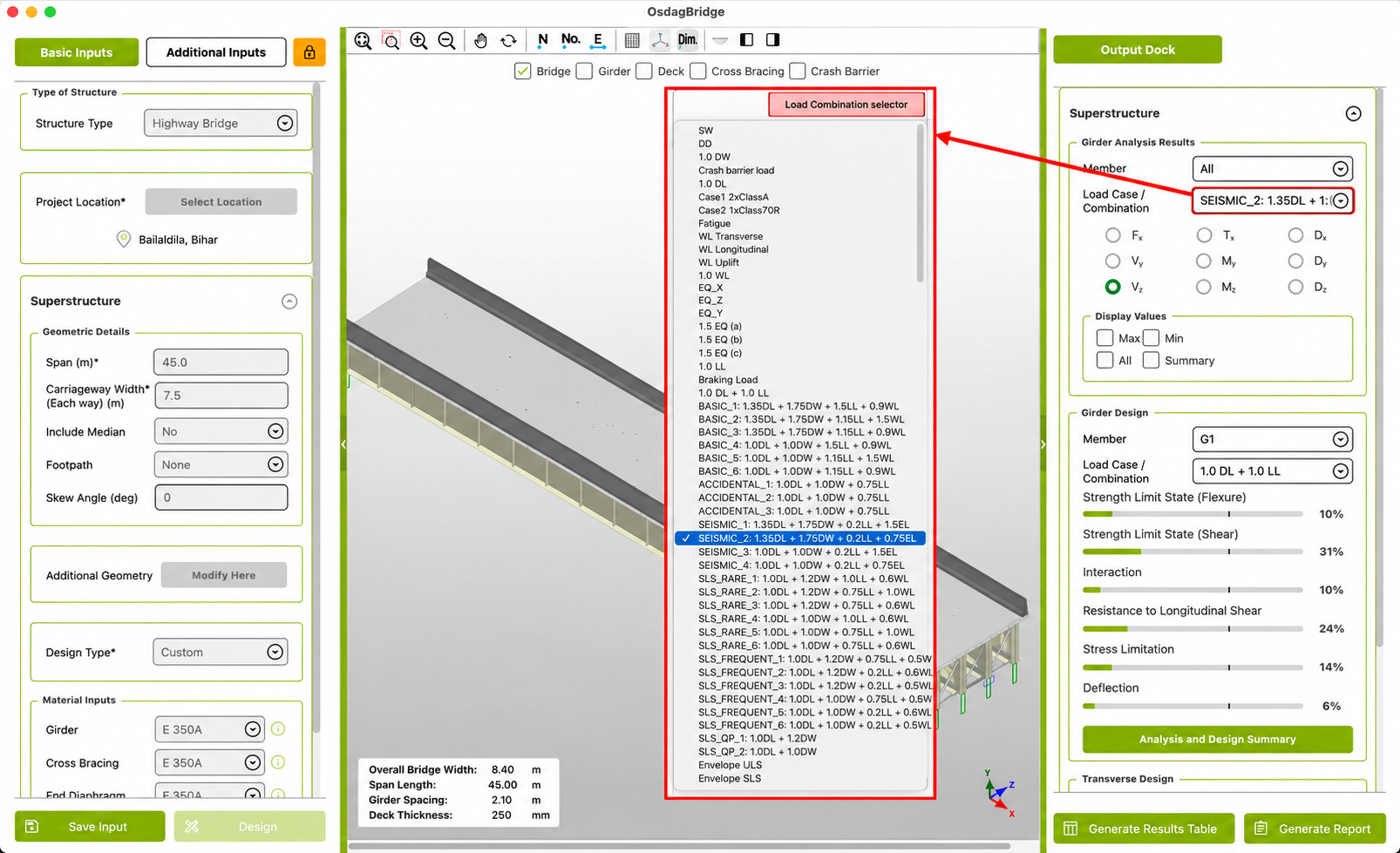
Load combinations follow IRC:6 by default and are generated automatically — the user is not required to define them, though additional custom combinations can be added. Once analysis is complete, the Load Combination selector for a given girder groups the available cases into the following categories:
| Category | What it contains |
|---|---|
| Dead Loads | Individual dead-load, wind-load, seismic, and braking load cases. |
| Vehicle Loads | Individual live-load vehicle cases and the combined live-load case. |
| Total Load (DL+LL) | The basic serviceability combination of dead load and live load. |
| ULS Combinations | Ultimate Limit State combinations that combine the relevant dead, live, wind, and seismic effects using the applicable partial safety factors. |
| SLS Combinations | Serviceability Limit State combinations for frequent, rare, and quasi-permanent loading conditions. |
| Envelope | Envelope ULS and Envelope SLS results representing the governing result across the applicable combinations within each limit state. |
The Load Combination selector groups these cases into separate categories, making it possible to distinguish the individual load cases from the combined ULS, SLS, and envelope results.
5.3.3 Analysis Results
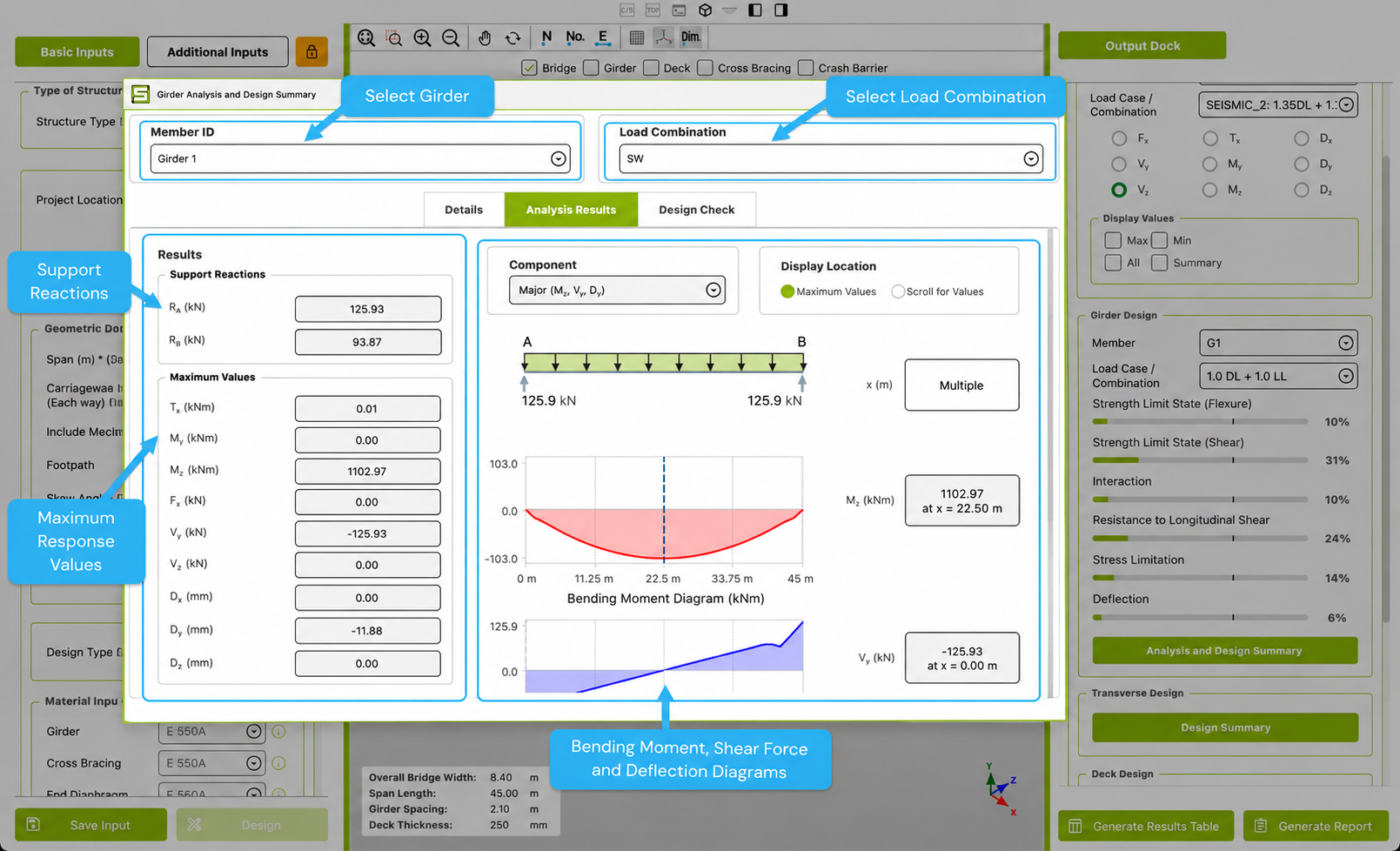
After the analysis is completed, OsdagBridge displays the results for the selected girder and load combination. The Analysis Results panel provides:
- Support Reactions — reactions at both ends of the selected girder.
- Maximum Values — maximum force and deflection components along with their locations on the span.
- Bending Moment Diagram — variation of bending moment along the girder.
- Shear Force Diagram — variation of shear force along the girder.
- Deflection Diagram — variation of deflection along the girder.
The required Member ID and Load Combination can be selected from the dropdowns at the top of the panel. The results and diagrams update for the selected combination.
5.4 Girder Design Checks
Once the grillage analysis is complete, OsdagBridge checks the steel I-girders against the applicable IRC and IS design provisions for the governing load combinations.
This section describes the design checks performed by OsdagBridge and how their results are presented in the Girder Analysis and Design Summary.
5.4.1 Design Philosophy and Applicable Codes
OsdagBridge follows the Limit State Design (LSD) approach. The design checks cover both:
- Ultimate Limit State (ULS) — checks strength, stability, and safety against failure.
- Serviceability Limit State (SLS) — checks deflection, stress limits, and performance under operational loads.
The main design codes used by OsdagBridge are:
| Code | Application |
|---|---|
| IRC:5 | General design features and minimum requirements for road bridges. |
| IRC:6 | Loads and load combinations, including dead, live, wind, seismic, and temperature effects. |
| IRC:24 | Limit state design of steel road bridges. |
| IRC:22 | Limit state design of composite construction — the primary basis for the girder design checks. |
| IS 800:2007 | Structural steel design, including member strength and stability. |
| IRC:112 | Concrete road bridge design, including deck-related checks. |
| IRC:SP:114 | Seismic design guidelines for road bridges. |
5.4.2 Girder Design Checks
After analysis, OsdagBridge performs design checks on the steel I-girders for the governing load combinations. The checks are based on the applicable IRC and IS provisions and are presented in the Design Check tab of the Girder Analysis and Design Summary.
Ultimate Limit State Checks
The following Ultimate Limit State (ULS) checks are performed:
- Section classification — based on IS 800:2007.
- Ultimate flexural resistance — checks the composite section against the design bending moment according to IRC:22 Clause 603.3.1.
- Shear resistance — checks shear capacity and shear buckling according to IRC:22 Clause 603.3.3.2.
- Bending–shear interaction — checked according to IRC:22 Clause 603.3.3.3.
- Shear connector capacity and spacing — checked according to IRC:22 Clause 606.
The Design Check tab displays the check status and utilization ratios for the available checks.
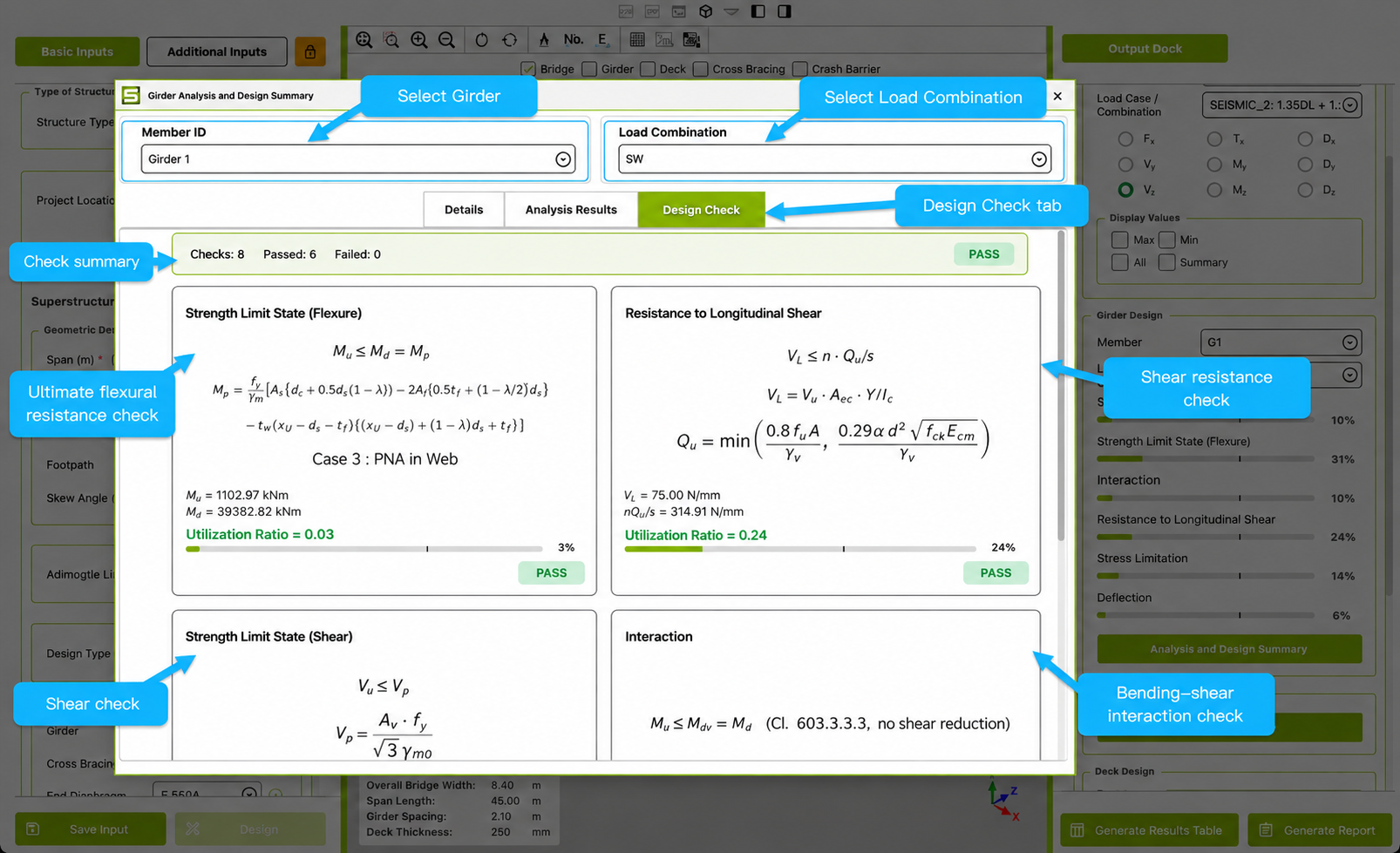
Figure 5.4.2: Design Check tab showing the check status, flexural check, longitudinal shear check, and utilization ratios.
Serviceability Limit State Checks
OsdagBridge also performs the following Serviceability Limit State (SLS) checks:
- Deflection control — live-load deflection limited to L/800 and total-load deflection limited to L/600, according to IRC:22 Clause 604.3.2.
- Maximum stress under service loads — according to IRC:22 Clause 604.3.1.
- Fatigue assessment — according to IRC:22 Clause 605.
Construction-Stage Check
OsdagBridge includes a lateral torsional buckling check for the bare steel girder during the construction stage, before the girder acts compositely with the deck. This check is based on IRC:22 Clause 603.3.3.1.
The construction-stage analysis is enabled through the construction-stage analysis setting in Additional Inputs. When enabled, the resulting utilization is shown as Lateral Torsional Buckling in the design summary.
The equations and calculated values for the individual checks are not described here. This section is intended to explain the checks available to the user and where their results are presented.
5.4.3 Reading the Girder Design Summary
The Girder Analysis and Design Summary provides the results for an individual girder. It is organized into three tabs:
- Details — displays the girder's material grade, section type and designation, section classification, dimensions, restraint conditions, and calculated section properties. A labelled cross-section preview is also provided.
- Analysis Results — displays analysis results such as support reactions, maximum force and deflection values, and corresponding diagrams. These results are described in Section 5.3.3.
- Design Check — displays the results of the girder design checks and their utilization ratios. The design checks are described in Section 5.4.2.
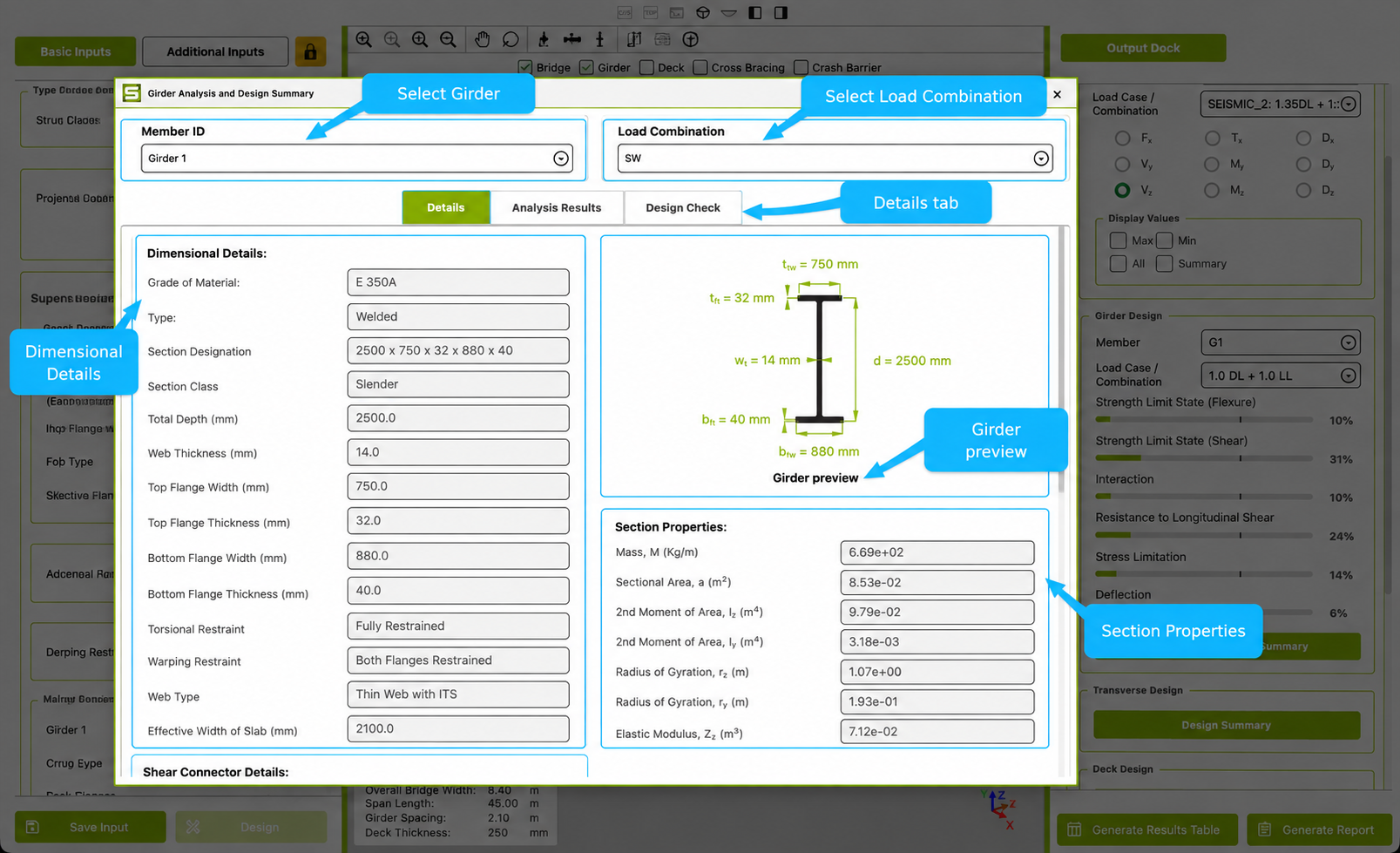
Figure 5.4.3: Girder Analysis and Design Summary — Details tab showing girder properties, section dimensions, restraints, and the cross-section preview.
Details Tab
The Details tab provides the main section information for the selected girder, including:
- Material grade
- Section type and designation
- Section classification
- Section dimensions
- Torsional and warping restraint conditions
- Calculated section properties
- Girder cross-section preview
5.5 Transverse Member Design
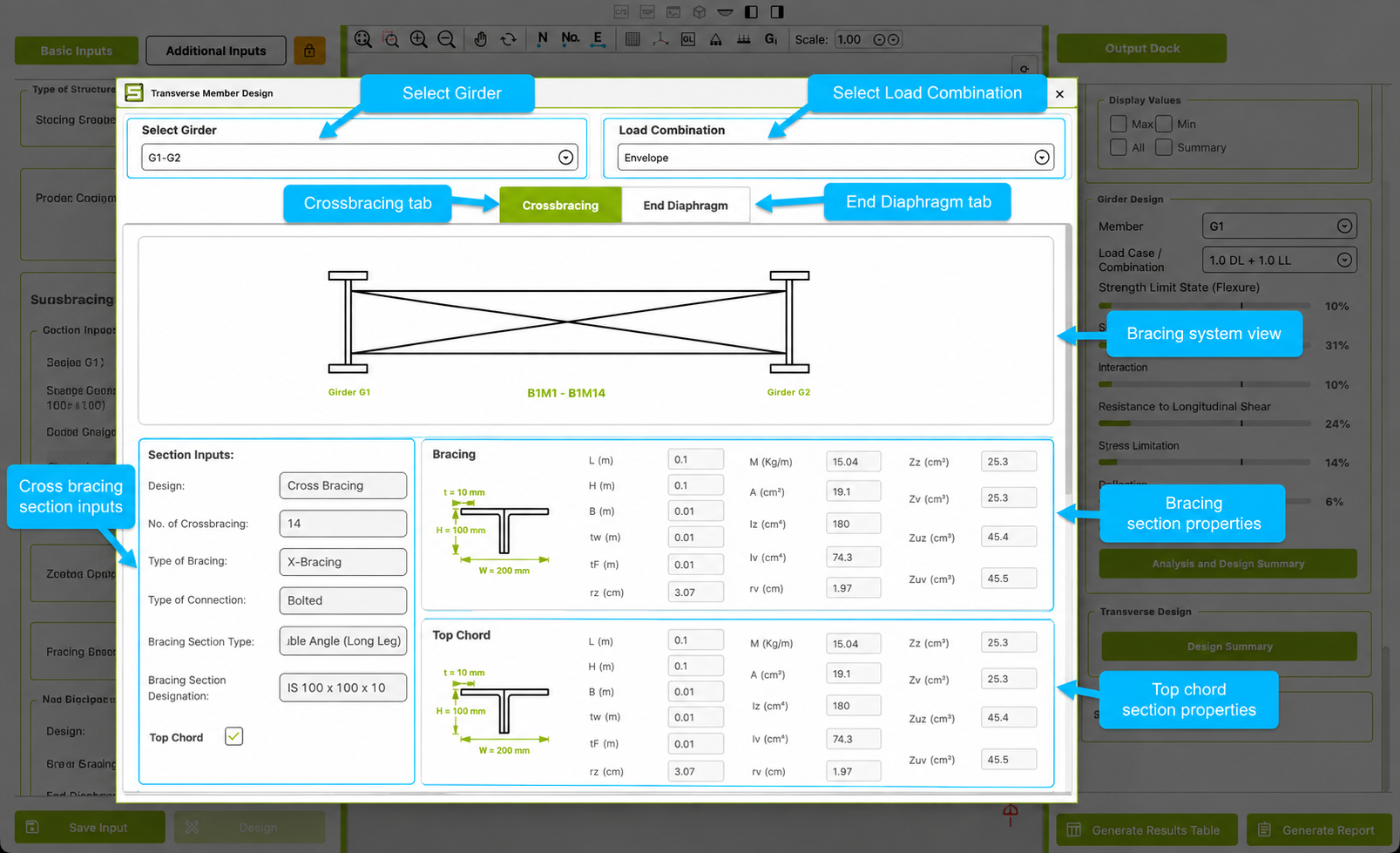
OsdagBridge computes the section properties of the transverse members connecting the girders — cross bracing and end diaphragms — and displays them in a separate Transverse Member Design window, opened for each girder pair (for example, G1-G2).
The window is organized into two tabs, Crossbracing and End Diaphragm. The Crossbracing tab shows the section geometry and computed properties for three parts of the bracing system separately: the diagonal bracing members, the top chord, and the bottom chord. For each member, OsdagBridge displays the member length, cross-section dimensions, mass per unit length, sectional area, moments of area, section moduli, and radii of gyration, along with a labelled cross-section preview.
In the example shown, the bracing members, top chord, and bottom chord have all been assigned the same section — a double-angle, long-leg section, IS 100 × 100 × 10 — which is why their computed properties are identical.
Unlike the Girder Design window, the Transverse Member Design window does not display a pass/fail result or utilization ratio for the cross bracing. It displays the section geometry and calculated properties of the transverse members.
5.6 Deck Design
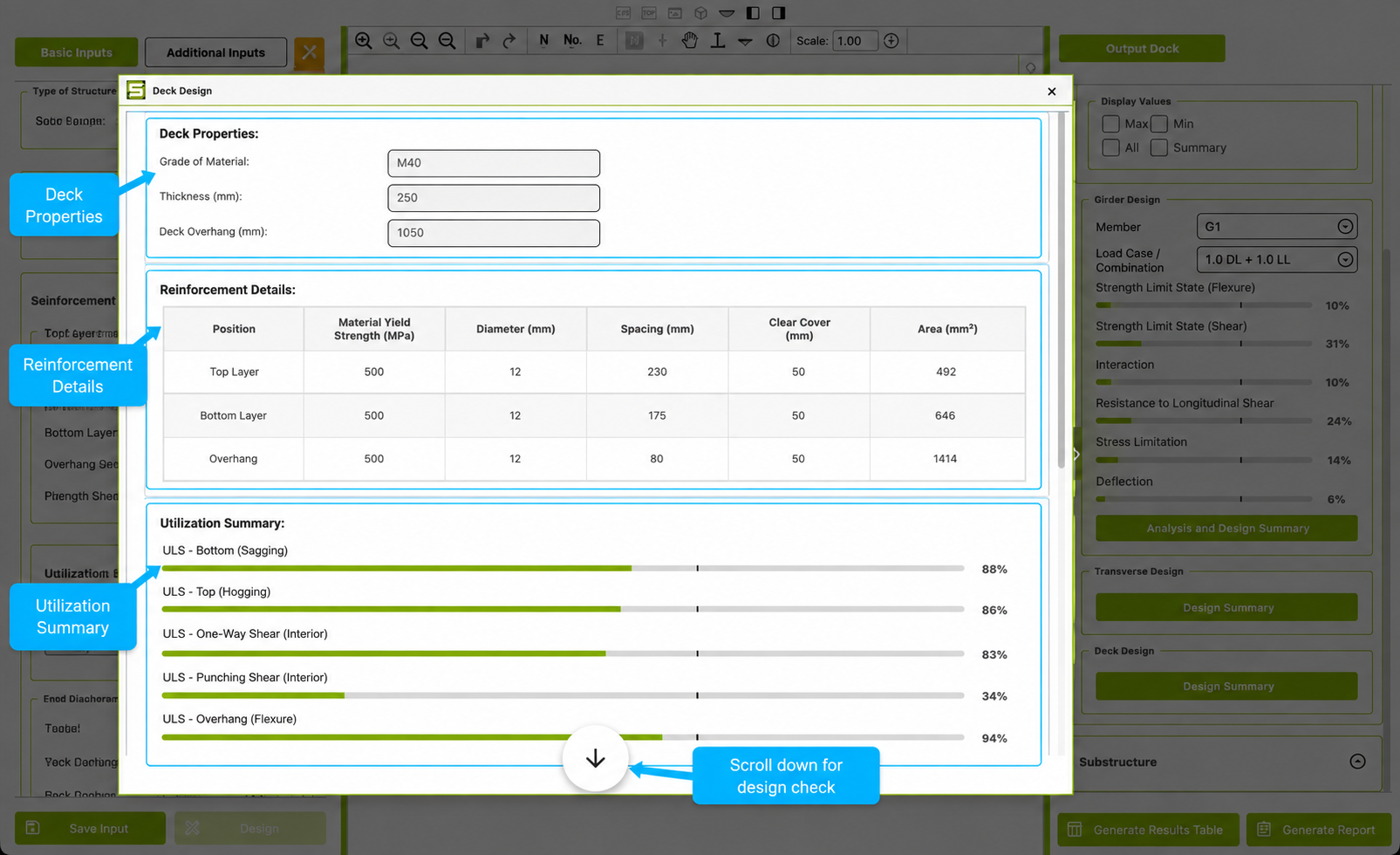
OsdagBridge computes the reinforcement details and utilization results for the concrete deck slab and displays them in a separate Deck Design window. The window shows the deck properties, reinforcement details, utilization summary, and design check information.
The Deck Properties section shows the grade of concrete, deck thickness, and deck overhang.
The Reinforcement Details table gives the reinforcement information for three positions on the deck — Top Layer, Bottom Layer, and Overhang. For each position, the table shows the material yield strength, bar diameter, spacing, clear cover, and provided reinforcement area.
The Utilization Summary shows the utilization percentages for the deck design checks. These include checks for bottom and top bending, one-way shear and punching shear for the interior and overhang regions, as well as serviceability checks for concrete stress, steel stress, and crack width. The utilization is shown as a percentage bar for each check.
The Design Check section provides the deck slab design summary, including the governing vehicle, impact factor, load factors, effective span, deck thickness, concrete and reinforcement grades, and the resulting design checks.
The Deck Design window therefore provides the reinforcement details and the corresponding utilization results for the deck slab in one place.